A trip planner that keeps time
Where to next?
Roamin Robin puts your whole trip on one timeline. Ask Robin for ideas, pick from real places, and watch each day come together hour by hour.
- Real places, found live
- Prices from Google, not guesses
- Plan with friends
How it works
From "no idea" to a full day in three steps
You say what you feel like doing. Robin goes and finds it. You decide what makes the cut.
Tell Robin what you are in the mood for
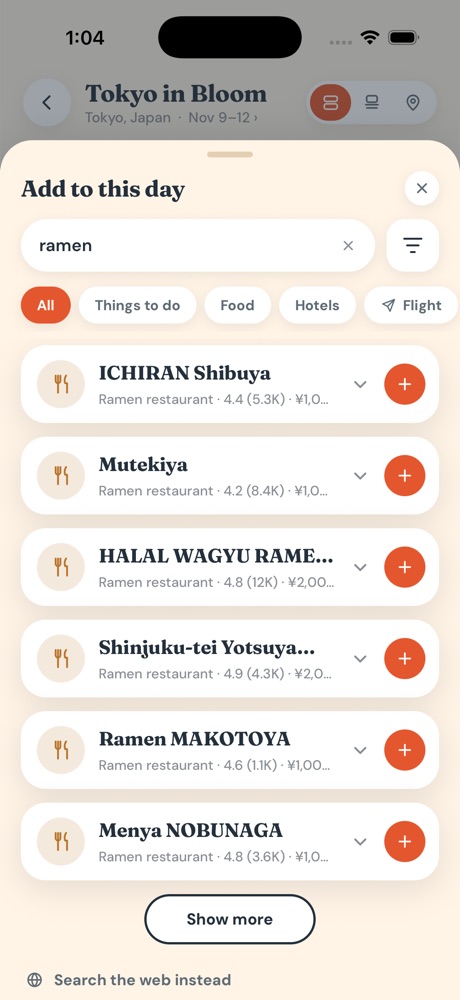
Type it the way you would text a friend. Robin turns that into a live search and brings back real places that are open for business.
- "Ramen near Shibuya"
- "Something outdoors and free this afternoon"
- Or send a photo and ask "where is this?"
Look before you add
Open any place to see it properly, without leaving your plan. Four tabs tell you whether it is worth the trip.
- Photos from Google Maps
- Map showing where it sits next to your other stops
- Place for the rating, hours, and address
- Website for the place's own site
The restaurant's own website, with the menu and how to find it.
Your day, in order, on the clock
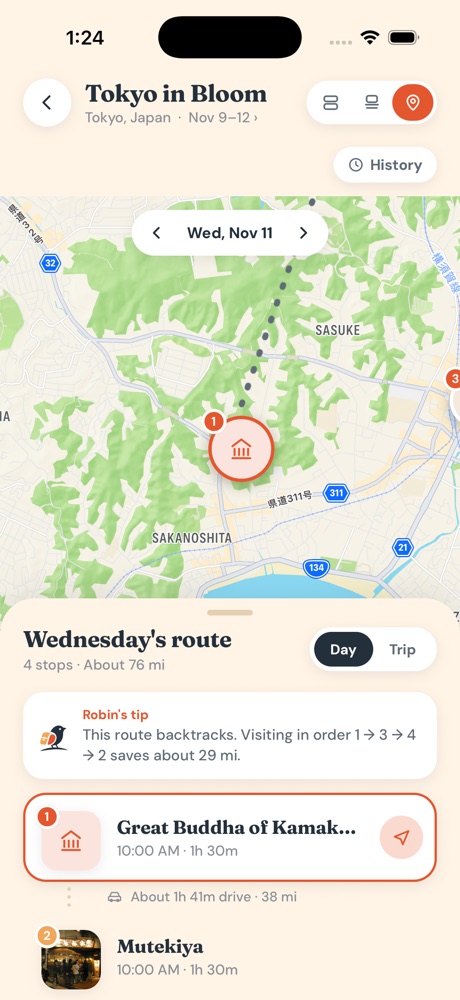
Every stop you add lands on a timeline with the time, the price, and how long it takes to reach the next one. Drag a stop to move it to a new spot in the day.
- A "now" marker shows where you are in the day
- If a new stop runs into the next one, it asks what you want to do
- One tap opens directions in your maps app
What it does
Everything a trip needs, in one place
A timeline that keeps time
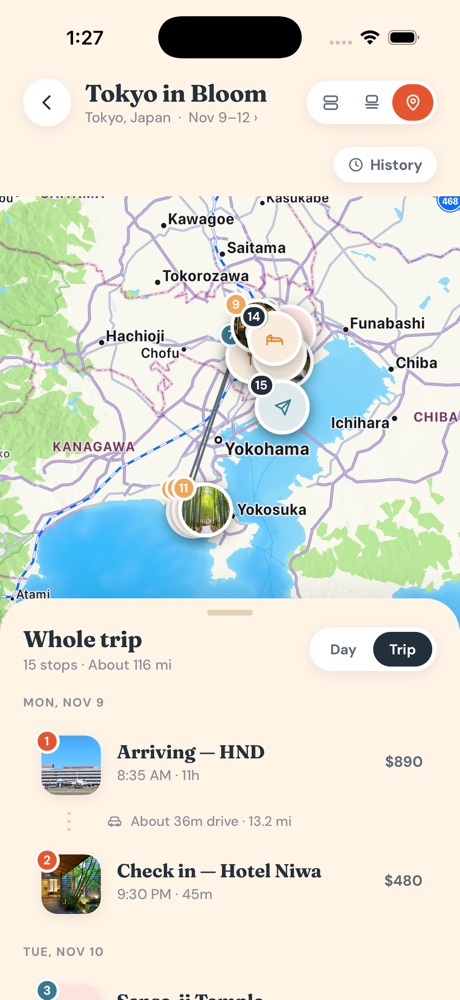
See the whole day at a glance, with every stop in order and the hours it actually takes.
A map of your day
Each stop is a numbered pin with its photo. Tap one and the map and your list move together.
Prices you can trust
Costs come from Google's own price ranges and show in dollars. Your trip total adds up as you plan.
Plan it together
Share a trip with one link. Everyone sees the same plan, and it shows who owes what.
Flights and stays
Add any flight by airport code or name, and your hotel, so the days start and end in the right place.
Weather on every stop
Each card shows the forecast for its own time and place, so you know when to bring a jacket.
Straight from the app
See it move
Real recordings and screens from Roamin Robin.
Guides
Plan better trips
Short reads on how to plan, and why planning this way works.
How to plan a trip day by day
A simple way to go from a list of ideas to days that actually fit.
Read the guideWhy an hour-by-hour plan beats a list
Lists tell you what to see. A timeline tells you whether you can.
Read the guidePlanning with friends, minus the group chat mess
How to get everyone on one plan and keep the money fair.
Read the guideQuestions
Good to know
Where do the places come from?
From Google. When you ask Robin for ideas, it runs a live search and shows you what comes back. Robin does not suggest places from memory, so you do not get spots that closed years ago or never existed.
How does it know what things cost?
Prices come from the price ranges Google lists for a place, converted to dollars at the current exchange rate. A restaurant shows its per-person range, and a hotel shows its nightly rate. If Google has no price, the card says so, and you can type the real one in.
Is it free?
You can start planning for free. Paid plans add room for more places and more chats with Robin. You can see the plans inside the app.
Can I plan a trip with other people?
Yes. Share a trip with a link and choose whether people can edit it or only view it. Changes show up for everyone, and costs can be split so you can see who owes what.
Does it work without a signal?
Your trips are saved on your phone, so you can open your plan anywhere. Searching for new places and asking Robin need a connection.
Which phones does it work on?
Roamin Robin is built for iPhone and is coming to the App Store soon.
Your next trip, sorted
Tell Robin where you are going. Start with one day and see how fast it fills in.